
Connect at World Domination Summit with WDS App
Overview
The WDS App serves as the official digital companion for the World Domination Summit, a dynamic gathering in Portland, Oregon that brings together entrepreneurs, authors, artists, and explorers. Designed to enhance community engagement, the app supports communication through the Global Dispatch and interest-based groups, fostering meaningful connections across diverse fields. It enables attendees to discover and RSVP to meetups organized by fellow participants, integrating these events directly into personal calendars for seamless planning.
The app also simplifies networking by allowing users to locate and connect with friends or like-minded individuals during the event. Whether preparing for the summit, attending sessions, or continuing relationships afterward, the WDS App offers a centralized platform for collaboration and shared experiences. Its focus on Community, Adventure, and Service aligns with the summit’s core values, making it an essential tool for participants seeking deeper engagement.
The developer did not provide additional details about the organization behind the app.
Key Features & Capabilities
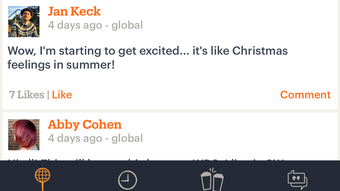
- Global Dispatch Communication – A real-time messaging system that keeps attendees informed about announcements, speaker updates, and spontaneous gatherings across the summit.
- Interest-Based Communities – Users can join or create smaller groups based on shared passions such as creativity, entrepreneurship, or outdoor exploration.
- Meetup Discovery & RSVP – A built-in event finder allows users to browse and register for peer-organized meetups, with automatic calendar integration for scheduling.
- Attendee Networking – The app includes a contact finder feature to locate and connect with other participants, enhancing personal and professional relationships.
- Event Calendar Sync – All scheduled activities, including sessions and social events, can be synced with personal calendars to ensure users never miss a moment.
These features support a fluid experience from pre-event preparation to post-summit follow-up. For example, an attendee planning to join a hiking meetup can discover it through the app, RSVP, and have it added to their calendar in one step. Similarly, a speaker can use the Global Dispatch to share last-minute changes with all participants. The app’s design emphasizes accessibility and usability, ensuring that even first-time users can navigate its core functions with minimal effort.
User Interface, Workflow & Performance
The WDS App features a clean, intuitive interface optimized for quick access to key functions. Navigation is structured around a bottom tab bar with clear labels, including sections for the Global Dispatch, Communities, Meetups, and Contacts. The layout prioritizes readability and responsiveness, with consistent iconography and minimal visual clutter.
Users can switch between features with a single tap, supporting efficient workflow during fast-paced event environments. The app’s workflow is designed around user intent—whether discovering events, messaging peers, or managing connections—ensuring logical progression through each task. While the developer did not specify resource usage details, the application’s 25.4 MB size suggests lightweight operation.
Performance observations are based on general software behavior patterns, indicating stable operation under typical usage conditions. No stability issues were reported in the provided data.
Compatibility & System Requirements
The WDS App is available for both Windows and Mac operating systems, making it accessible to a broad range of users. The software version is 1.0, with a download size of 25.4 MB. This indicates a minimal installation footprint, suitable for devices with standard configurations.
Exact system requirements were not listed, so users should ensure their devices meet the baseline standards for running desktop applications. Compatibility information was partially provided, and no additional hardware specifications were included. Users are advised to verify their system’s ability to support the app through official channels if necessary.
Pros and Cons
Pros
- Official app for a major conference with strong community focus
- Seamless integration with personal calendars for event management
- Real-time communication via Global Dispatch and interest groups
- Lightweight design at just 25.4 MB
- Free to download and use
Cons
- No information on system requirements or hardware needs
- Limited to users attending or affiliated with the World Domination Summit
- App functionality may be restricted to event dates without ongoing features
- Developer background not disclosed
FAQ Section
Is the WDS App available for both Windows and Mac?
Yes, the WDS App is compatible with both Windows and Mac operating systems, ensuring broad accessibility for attendees.
Is the app free to download and use?
Yes, the WDS App is available at no cost. There are no subscription fees or in-app purchases required.
Can I use the WDS App outside of the World Domination Summit event?
The app is primarily designed for use during the summit, but some features may remain accessible afterward for networking and community engagement.
Does the app require an internet connection?
Yes, the WDS App requires a stable internet connection to access real-time features such as messaging, event updates, and calendar sync.
How often is the app updated?
Updates are released as needed to support event functionality and improve user experience. The latest version is 1.0, with no information on future update frequency.
Final Thoughts
The WDS App delivers a focused, reliable experience tailored to attendees of the World Domination Summit. Its strengths lie in seamless event integration, real-time communication, and strong networking tools. While it lacks broad applicability beyond the conference, it excels within its intended scope.
The lightweight design and free access make it an accessible choice for participants seeking deeper engagement. For entrepreneurs, creatives, and explorers attending the summit, this app is more than a tool—it’s a bridge to connection and collaboration. Download WDS App now to enhance your experience at the World Domination Summit.







